When teams start posting data to Celestia, consensus is rarely the problem. The friction is in the small, easy-to-get-wrong steps before that: choosing a namespace, encoding it correctly, making sure it isn't already used, getting a light node running, and posting that first blob.
We built the AxionisHub Builder Console to take that friction away. Here are the mistakes we kept seeing, and how to avoid them.
ENCODING What a namespace actually is
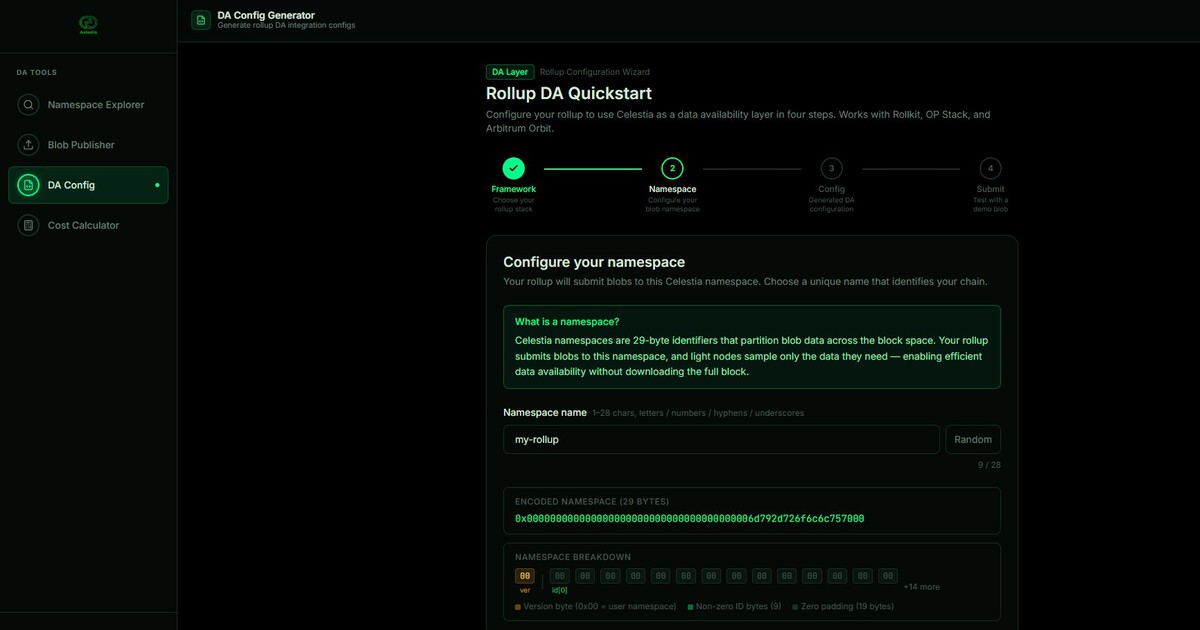
A Celestia namespace is how your rollup's data is labeled and separated from everyone else's on the DA layer. Under CIP-19, a version-0 namespace is exactly 29 bytes: one version byte (0x00) followed by a 28-byte ID.
For v0 the first 18 bytes of that ID must be zero, and your actual data goes in the last 10 bytes. So a namespace for my-rollup is:
0x00 + 18 zero bytes + 10-byte encoding of the name02 / MISTAKE 1 Wrong byte layout
The most common encoding bug is putting your name at the start of the ID and padding with zeros on the right. That produces a 29-byte value that looks fine but is not a valid v0 namespace, because v0 requires the 18 leading zero bytes.
The fix: zero-pad on the left (18 bytes), data in the last 10.
0x00 | 6d79 2d72 ... 0000 0000 0000 0000 00000x00 | 0000 0000 0000 ... 0000 | 6d79 2d72 6f6c 6c75 7000The Console's Namespace Explorer colors the layout—version / 18 zero padding / 10 data bytes—so you can see it's valid before you ship.
03 / MISTAKE 2 Writing into a namespace someone already uses
Namespaces aren't owned. Anyone can write to any namespace. If you pick a common name you may end up sharing it with another rollup, which makes your data harder to find and filter later.
Before you commit, check whether a namespace already has blobs in it. The Console's lookup queries the live network (via Celenium) and tells you if it's free or already used, and how much data sits there.
04 / MISTAKE 3 Using a reserved namespace
CIP-19 reserves certain ranges for system use (PayForBlob, transactions, parity shares, and so on). Writing into those is invalid.
The Explorer flags reserved ranges as invalid with the reason, so you don't pick one by accident.
05 Getting onto Celestia: light node + first blob
To post data yourself you run a Celestia light node and submit through its node API. The quick path:
- Install
celestia-node - Init:
celestia light init - Start:
celestia light start --core.ip <consensus endpoint> - API available at
localhost:26658
# Init and start a Celestia light node
celestia light init
celestia light start --core.ip consensus.celestia-arabica-11.com
The Console's Blob Publisher submits your first blob through that local node.
06 Wiring a rollup's DA
If you're running a rollup framework (Rollkit, OP Stack, Arbitrum Orbit), the last step is pointing it at Celestia as its DA layer. The Console's DA Config Generator walks you through framework → namespace → config and outputs the integration config.
# Example Rollkit DA config snippet
[da]
  type = "celestia"
  namespace = "0x00000000000000000000000000000000000000006d792d726f6c6c757000"
  rpc  = "http://localhost:26658"
  auth_token = "..."
07 Start building
None of these steps are hard once you've done them once. The Console exists so your first time is your easy time.